A mammography system can have years of useful clinical life left after its original warranty expires. What changes at the end of the warranty is not necessarily the equipment itself, but who carries the financial and operational risk when something goes wrong.
Once coverage ends, replacement parts, service labor, preventative maintenance, and unexpected repairs may become the facility’s responsibility. That makes the months before expiration an important planning window. Rather than waiting for the first post-warranty service call, facilities can review the condition of their Hologic system, understand where the greatest repair exposure lies, and decide how they want future service costs handled.
For facilities still reviewing their coverage options, it can also help to understand what a mammography equipment warranty actually covers before planning for the post-warranty period.
The most common approaches include parts-only coverage, time-and-material service, and full parts-and-labor coverage. The right choice depends on the system, the facility, and how much risk the organization is prepared to manage internally.
What Changes When Your Mammography Equipment Warranty Expires?
When the warranty expires, the system may continue performing exactly as expected. The difference is that repairs, parts, and service that were once covered can now become direct facility expenses. That shift is worth planning for, especially when a larger repair could affect both the maintenance budget and day-to-day operations.
Repair Costs Shift Back to the Facility
Depending on the previous warranty and the service arrangement that follows it, a facility may become responsible for replacement parts, service labor, engineer travel, shipping, diagnostics, and emergency repair costs. Preventative maintenance may also need to be arranged separately.
The key change is financial responsibility. A repair that would previously have been handled under warranty can now require approval, sourcing, scheduling, and payment by the facility. Knowing how repairs will be handled after the warranty expires can make the process easier when service is needed.
Downtime Becomes a Financial Risk, Not Just a Repair Problem
The cost of a failure is not limited to the invoice for a replacement component. If a mammography system is unavailable, patients may need to be rescheduled, imaging capacity can be reduced, and staff workflows can be disrupted. The facility may also lose revenue while waiting for diagnostics, compatible parts, or an available engineer.
A post-warranty plan should address both repair costs and response time. Knowing who to contact, where to source parts, and who can perform the work can reduce delays when the system is down.
Assess Your Hologic System Before the Warranty Ends
A useful post-warranty strategy starts with the system you already have. Ideally, start the review about 60–90 days before warranty expiration so you have time to assess the equipment and compare support options without the pressure of an active failure.
Review the System’s Service and Repair History
Review previous service reports and note recurring fault codes, components already replaced, the frequency of service calls, and findings from recent maintenance. An increase in repair frequency or repeated attention to the same area can help you estimate future service needs.
Past parts and labor expenses can also provide context. They don’t predict exactly what will fail next, but they can show how much support the system has required and whether a pay-as-needed approach fits the facility’s risk tolerance. For a closer look at the role of routine care and records, see Maintenance Tips for Optimal Mammography Equipment Performance.
Consider System Age, Utilization, and Configuration
Two systems of the same model may create very different post-warranty needs. Consider system age, examination volume, 2D versus 3D configuration, current physical and technical condition, previous upgrades or refurbishment, and the availability of compatible replacement parts.
The review should also include the broader configuration. Acquisition and diagnostic workstations, biopsy accessories, and other connected equipment can affect whether the complete clinical workflow remains available.
Know Which Hologic Components Create the Greatest Post-Warranty Exposure
Not every repair carries the same financial or operational impact. The goal is not to predict every possible failure, but to understand which parts could create the greatest exposure if they need replacement after warranty coverage ends.
High-Cost, System-Critical Components
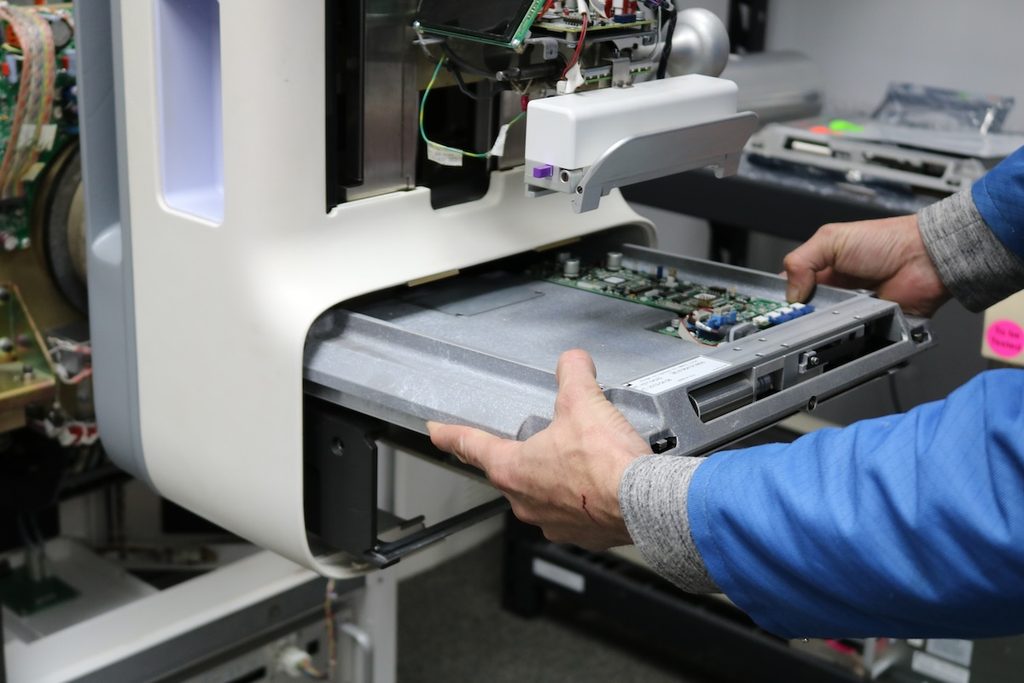
Components such as the digital detector, X-ray tube, generator, CPUs, and major electronic boards deserve particular attention in post-warranty planning. A failure in this category can combine a significant replacement cost with sourcing time, installation requirements, and system downtime.
That combination is what makes these components important. The question is not simply how much a part costs, but how quickly you can identify and obtain a compatible replacement, what technical work is required to install it, and how long the system may be unavailable in the meantime. System use also affects which components are more likely to need attention over time, particularly in higher-throughput Hologic Dimensions systems.
Don’t Forget Workstations, Biopsy Systems, and Accessories
The complete mammography workflow also depends on acquisition and diagnostic workstation computers, medical-grade monitors, biopsy components, compression components, power supplies, cables, and associated electronics. A less expensive component can still cause major disruption if the system cannot operate without it.
Plan for Expensive Parts Before They Fail
Planning ahead does not mean routinely stocking costly detectors or tubes. Instead, keep system and component information accessible, identify a qualified parts supplier, understand likely parts availability, determine who will perform installation, and know whether calibration or testing will be required. Establishing service and escalation contacts in advance can save time later. This kind of preparation can also help facilities make more informed repair decisions when a high-cost component fails, rather than evaluating parts and service options under the pressure of downtime.
Choose the Right Post-Warranty Service Model
There is no single service arrangement that is right for every imaging facility. Patient volume, available technical resources, system condition, tolerance for unexpected expenses, and the financial impact of downtime should all influence the decision.
Parts-Only Coverage
Parts-only coverage can make sense for facilities that already have in-house biomedical capabilities or work with a trusted local service engineer. In this model, the facility secures access to covered replacement parts while continuing to manage labor and technical service through its existing resources.
This can help keep fixed service expenses lower while providing a defined path for parts support. It is particularly relevant when the main concern is reliable access to Hologic replacement components rather than comprehensive labor coverage. Facilities considering this structure can explore MedSource Imaging’s Parts-Only Contract.
Time-and-Material Service
Time-and-material service is a pay-as-needed approach. Instead of purchasing comprehensive annual coverage, the facility requests service when needed and pays for the labor, travel, and parts associated with that service.
This model can be a practical option for systems with relatively infrequent service needs or for facilities that prefer to manage service expenses as they arise. Costs can vary from year to year depending on the type and frequency of repairs, giving facilities the flexibility to use service based on their actual needs. MedSource Imaging’s Time and Material Service is available for facilities that prefer this approach.
Full Parts-and-Labor Coverage
Full parts-and-labor coverage may be a better fit for higher-volume imaging facilities, sites without internal or local technical support, or organizations where downtime is especially costly. It can also be useful when predictable service expenses are a priority or when a major component failure would be difficult to absorb as an unplanned cost.
Under this arrangement, eligible parts and labor are handled through the service contract rather than managed as separate repair expenses. MedSource Imaging’s Full Parts and Labor Service Contract may be available for eligible Hologic systems even when the equipment was originally purchased from another supplier.
The best model is ultimately the one that matches the facility’s resources and risk profile- The right choice depends on the system’s service needs, the technical resources available to the facility, and how the organization prefers to manage repair and maintenance costs
Keep the Right System and Service Information on File
When equipment fails, you can lose valuable time identifying the exact configuration and determining which part or service resource you need. Keeping essential information together helps the troubleshooting and sourcing process start with better information.
Information That Can Speed Up Parts and Service Requests
Keep the following readily available:
- Hologic system model and serial number
- System configuration
- Software and version information, where relevant
- Existing part numbers and revisions
- Previous service reports and parts replacement history
- Recent error codes and symptoms
- Preventative maintenance records
- Service-provider contact information
The goal is simple: avoid starting the identification and sourcing process from zero during a service event. Accurate system details can also help a parts provider identify the correct component more quickly. MedSource’s Hologic Mammography Parts resource can be a useful starting point when you need replacement parts.
Build Your Post-Warranty Support Plan Before Coverage Ends
The best time to decide how a facility will handle a major repair is before one occurs. A structured review 60–90 days before warranty expiration gives the organization time to compare options and put the necessary contacts and information in place.
60-90 Days Before Warranty Expiration
Review the system’s service history, current condition, and upcoming preventative maintenance needs. Confirm what technical support is available locally or in-house and review the availability of important replacement parts. It is also useful to estimate the financial impact of a major component failure, including both the repair itself and potential downtime.
Then compare parts-only, time-and-material, and full parts-and-labor coverage. Record essential system information and select a provider and escalation path before the warranty expires.
In some cases, this assessment may show that continued repair no longer makes financial or operational sense. That is a separate decision from post-warranty service planning. Facilities reaching that point can review Signs It’s Time to Replace Your Mammography System.
How MedSource Imaging Can Support Your Hologic System After Warranty
MedSource Imaging provides Hologic parts and service support beyond the original warranty, with options that can be matched to your system and facility needs.
Hologic Replacement Parts and Engineer-Assisted Support
MedSource Imaging provides access to refurbished Hologic replacement parts for mammography systems, workstations, and biopsy equipment. Engineer-assisted support can help confirm part revisions, configuration details, and compatibility before ordering, reducing the risk of delays caused by an incorrect part.
Flexible Service Options Based on Your Facility’s Needs
Post-warranty options include parts-only coverage, time-and-material service, full parts-and-labor coverage, and preventative maintenance. Eligible Hologic systems may qualify for service coverage even if you originally purchased the equipment from another supplier.
Plan Before the Next Repair Becomes an Emergency
If your Hologic mammography system is approaching warranty expiration, reviewing your support options in advance can make future service easier to manage.
Speak with MedSource Imaging about the coverage and service options available for your system, or submit a Service Request to get started.
Frequently Asked Questions About Post-Warranty Mammography Service
Yes. Post-warranty service coverage is available for eligible Hologic systems, even if the original warranty has already expired. MedSource Imaging can review your system and help determine which service option best fits your equipment and support needs.
Yes, our service-contract support may be available for eligible Hologic systems purchased from another supplier. The facility can provide its system details so we can evaluate the appropriate service options.
Neither option is automatically better. Parts-only coverage may suit facilities with reliable technical support already in place, while full coverage may be more appropriate when predictable expenses and broader service support are priorities.
Without applicable coverage, the facility may be responsible for the replacement part, labor, shipping, travel, and related service costs. Planning ahead can help establish where the component will be sourced and who will perform the required work.
Not necessarily. Warranty expiration alone does not determine whether a system should be replaced. Consider its age, condition, service history, parts availability, repair frequency, and the financial and operational impact of keeping it in service.